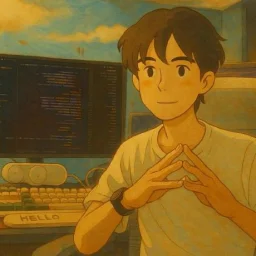

Watch first.
All nine segments play here.
This is the preview page I reviewed. It runs the same scene code Remotion used for the 4K render, so what you see is the final film. Pick a segment; tick 带上配乐音效 for the sound design and music alongside the narration, or 叠上头像和字幕 to see where my avatar and subtitles sit in the edit.
For smooth playback the preview uses MP3 audio and compressed MP4 clips; the delivered film is 3840 × 2160 at 30fps. The first load is about 30 MB. Illustrative (not recorded) frames are listed at the bottom of the preview.
I handed over four things.
Final subtitles
268 subtitle lines from the edited cut, 7:40 in total. This is how the agent knows when every line is spoken.
Ranges I already recorded
01:00–01:19, 01:51–02:30, 03:04–03:45 and 04:06–04:16 were screen recordings on Windows and needed no B-roll.
Narration
Exported from the master, so the preview can play picture and voice together.
Screenshots
Ten comment screenshots from Douyin and Bilibili, view counts for two episodes, and the GitHub source page. The agent fetched the website and logos itself with ego-browser.
Everything else had to be covered: the master only shows a teleprompter and my avatar. That came to nine segments, about 350 seconds, over 70% of the film.
Before starting, the agent used the Skill's rules to cut my recording list from six clips to three. Anything animation could explain, such as the side-by-side 'take over halfway' comparison, did not need recording.
How the Skill works
scenes.js holds HTML plus declarative animation. The preview and Remotion run the same code, so an approved preview is the final film.
Layout, colour, type, sound and music live in the template. Switching templates does not rewrite content, which mattered later.
Iterate until the preview is approved, then render straight through to delivery.
I rejected
the first template.
The agent started with 纸白信号橙 (paper white and signal orange), the template I had saved earlier, and built segment 02 as a sample. My reply: 'This template is too ugly. I don't want it.'
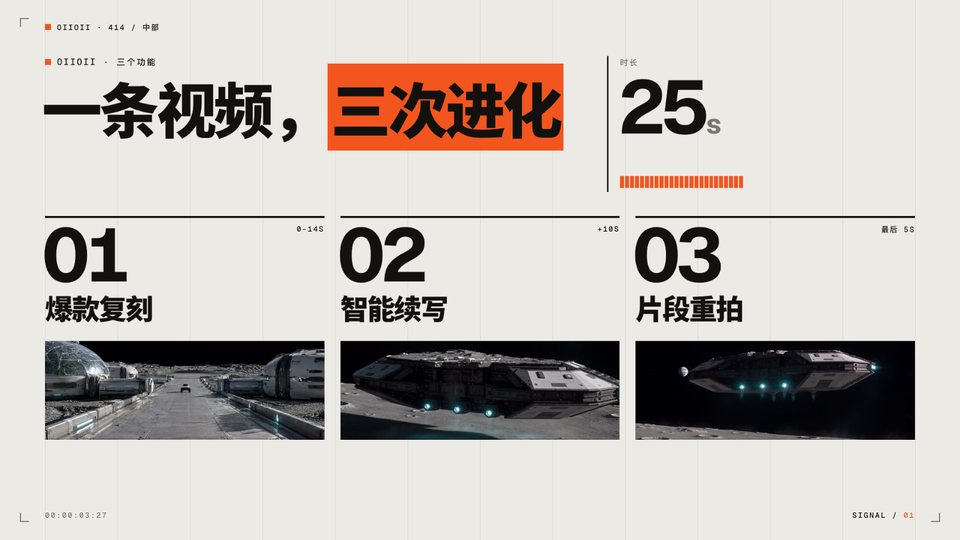
So I had it run two subagents against each other. Each built the same 19-second segment, then reviewed the other's work: three fatal problems, two things the rival did better, then another revision.
Built from Ego Lite's own brand: a blue sky dome, thin-and-heavy headlines, real windows in perspective, a slow push-in.
Built from my personal site: warm paper, serif headlines, captioned screenshots, hand-drawn circles.


What each said about the other
Warm paper and serif type taste just like the template I had rejected.
A sky gradient with thin-and-black headlines fits any product with a logo swap; nothing says it is my channel.
The agent recommended B for channel identity. I picked A: this was a product launch, and I wanted the polish and impact of a launch film.
Show it
when it is said.
With the template chosen, four agents built the other eight segments in parallel. The first full cut arrived about half an hour later. My note: sometimes what I say does not match the picture.
The agent first read this as 'titles appear early', compared 102 on-screen text items with the subtitles and fixed a dozen. That was not my point, so I sent a screenshot:

Second point: too many images, the same few screenshots cycling. Where they made no sense, build the interface and motion in HTML instead.
The rebuild did four things:
- A line-by-line storyboard: about 230 lines across nine segments, each with its picture and whether it is real footage or HTML. Screenshots only where proof is needed (comments, view counts, source, Excel results, website, recorded clips), at most twice per film.
- Word anchors: every icon, window and screenshot appears when a specific word is said. Times are looked up from the subtitles, 0.12s early by default, never typed by hand.
- A shared UI kit: browser windows, Space tabs, cursor clicks, terminal typing, tables filling row by row, CAPTCHAs, token meters. All four agents used the same parts.
- Two checks: a script compares each element's entrance with the moment its word is spoken and flags anything over 0.45s; then a line-by-line 'words | picture' contact sheet is reviewed frame by frame.
How anchors are written (excerpt from this episode's scenes.js)
// scenes.js 头部(节选):按 SRT 查出某个词开口的时间
function SAY(seg, word, nth) { … }
// 相对当前场景的秒数,默认比开口早 0.12 秒
function AT(sc, seg, word, off, nth) {
  return +Math.max(0, SAY(seg, word, nth) - (sc && sc.from || 0) + (off == null ? -0.12 : off)).toFixed(2);
}

// 第 01 段「把 Chrome 替换掉」这一页(节选)
// 说到“Chrome”时 Chrome 图标才出现,“替换掉”时被划掉、向左推走,ego 图标从右边顶进来。
build: function () {
  var tC = at(this, 'Chrome'), tX = at(this, '替换'), tR = at(this, '替换掉');
  return … + TT('把 <b class="hl">Chrome</b> 替换掉了', tC) +
    UI.icon('chrome', { t: tC, strike: tX, out: tR + .15, outFx: 'left', label: 'Google Chrome' }) +
    UI.icon('ego', { t: tR + .2, fx: 'right', label: 'ego (lite)' }) + …;
}
Sync audit output for the final version
$ node broll-sync-audit.mjs http://localhost:8877/ 0,1,2,3,4,5,6,7,8
-- seg0: 29 个锚定元素
-- seg1: 1 个锚定元素
-- seg2: 19 个锚定元素
-- seg3: 28 个锚定元素
-- seg4: 14 个锚定元素
-- seg5: 25 个锚定元素
-- seg6: 40 个锚定元素
-- seg7: 25 个锚定元素
-- seg8: 28 个锚定元素
NOSAY seg7 [04 速度与省 Token] 省很多 Token @54.43
(NOSAY:有入场动画、但没锚到台词的元素,逐个人工确认,节选一条)
锚定元素全部同步
In the rebuilt v4, 208 elements were anchored to words, all within 0.45s (209 in the final version). At the opening: 'using it heavily' opens tab after tab in Ego Lite; 'made it my default browser' selects ego lite in system settings; Chrome appears only when I say 'Chrome', then gets struck out and pushed aside.

After the full cut,
I switched templates.
v4 was synced line by line. After watching it all, I said: 'Let's go with 便签复盘 (sticky audit).' The sky template had only won a 19-second contest; across nine segments I wanted graph paper, heavy black headlines and orange highlights.
Because scenes describe content, the switch was cheap. The agent added a compatibility layer on top of sticky audit so the keynote-era scenes picked up the new style. Content and timing carried over, and the audit still passed.


Only the 'Windows is here' page kept the keynote layout. After the switch I preferred the original, so its launch-page layout was ported back. That is the image at the top of this article.
The last fixes
came from my eyes.
① A screenshot didn't fill its window
The source screenshot filled only a corner of its window. It looked fine in the agent's headless checks but came up short in my browser, because a 3840px image was cropped by offset. The fix: crop it first with PIL.


② An icon looked AI-made
A gradient tile with a four-point sparkle: 'this looks too AI-generated.' Gradients went everywhere, and the agent icon became a terminal glyph. The rule went into the agent's long-term memory too.


③ Only four comments
The 'no Windows version' page showed four comments. I asked for a pile that builds up with sound. Now, from the word 'comments', ten cards drop 0.26s apart, each with a card sound, older ones darkening underneath.


④ The preview needed a zoom after switching
Switching to segment two broke the scale until I zoomed the browser and back. Rebuilding the stage reset its styles, including the scale; calling fit() after each build fixed it. The fix lives in the Skill's preview shell, so every future project gets it.
Once approved,
render straight through.
After I said 'render it', I did not step in again. The agent rendered nine 4K segments with Remotion, named each file after the range it covers, and added a replacement table. I dropped them onto the timeline.
3840 × 2160 30fpsMusic 16 dB under voicePeaks ≤ -18 dBFSNo narration in files
1_Windows终于来了_00-00-40,767~00-01-00,200_字幕33-43.mp4
What the delivery report said was verified
Frame counts match each range; resolution, frame rate, names, loudness and peaks are all in spec.
68 stills compared with the preview before rendering; recorded clips confirmed to move.
The agent did not listen to the audio and said so, asking me to check, especially the ten card sounds in the comment pile.
Want to try?
Start here.
npx skills add NanmiCoder/ajiang-vibe-coding-skills --skill ajiang-video-broll- 01
Install the Skill and give your agent the final SRT plus the rough cut or narration audio.
- 02
Mark the ranges you already recorded. Only the rest needs B-roll.
- 03
Build one sample segment first. If the template is wrong, let two agents compete on it.
- 04
Then develop the other segments in parallel. Anchor every icon, window and screenshot to the word that names it, and run the sync audit.
- 05
Decide the template after watching the whole film. Pre-crop screenshots and skip gradients and sparkle icons.
- 06
Render 4K only after approving the preview. The agent can measure loudness; you still need to listen.
I only gave it subtitles and audio. The real work was saying, line by line, what was wrong.
Sources and frames
The interactive preview shares scene code and assets with the final render; audio and clips are web-compressed. Final frames are captured from that preview. Keynote v4 and the A/B frames were rebuilt from the kept project files and scene code. The original paper-signal sample was not kept, so the template cover is shown. The three 'before' images are my original review screenshots.
The Windows download page, default-browser settings, Codex windows, CAPTCHAs, takeover and speed comparisons are illustrations, not recordings; the full list is at the bottom of the preview. The sticky-audit compatibility layer was made for this episode; the Skill ships the original sticky-audit template.